

Deposit at PHDream: Methods, Limits, and Payment Steps
Deposit at PHDream starts with a simple choice, but the details deserve attention. GCash, Maya, GrabPay, USDT, and online banking each work differently, while channel selection, amount limits, and bonus choices can affect how smoothly the transaction goes.
For anyone using Phdream, the useful habit is to treat every Deposit as a fresh transaction. Check the payment method currently available, confirm the channel shown in your account, enter the intended amount, and review any promotion before sending money. Those few checks can prevent most avoidable payment mistakes.
Deposit Methods Available at PHDream
The Deposit menu gives players several ways to fund an account. Current options include:
- GCash
- Maya
- GCashQR
- GCASHPAY2
- GrabPay
- USDT
- Online Banking
Having several methods is useful because not everyone keeps money in the same place. One player may already use GCash every day, while another prefers transferring directly from a bank. Someone who regularly holds cryptocurrency may find USDT more familiar.
The choice should come down to convenience and accuracy rather than simply picking the first button available.
GCash and GCash-Based Deposit Options
GCash appears in more than one form. Alongside the regular GCash option, players can also see GCashQR and GCASHPAY2. That range of payment options also helps explain why GCash is widely used for online betting in the Philippines, especially for players who already rely on the wallet for everyday transactions.
Inside the standard GCash Deposit screen, several channels may be available. Current examples include:
- G-Cash Ch.20
- G-Cash Ch.26
- G-Cash Ch.14
These channels are an important part of the transaction. If you previously deposited through Ch.20, for example, that does not mean Ch.20 should automatically be used again next time. The active choices displayed during the current Deposit should be treated as the source for that transaction.
A good routine is simple: Select GCash first, check the channel, then move on to the amount.
Maya, GrabPay, USDT, and Online Banking
Maya and GrabPay offer familiar e-wallet alternatives. If money is already sitting in one of those wallets, there may be little reason to move it elsewhere before making a Deposit.
Online Banking suits a different habit. Some players prefer funding directly from a bank because the transaction remains easy to trace through their banking records.
USDT is another option, but it requires more care. Crypto transfers are less forgiving when details are entered incorrectly. Before sending USDT, confirm the receiving address and the required network shown for that specific Deposit.
Choosing USDT just because it feels more technical does not make the transaction better. It makes sense mainly for someone already comfortable with wallet addresses, networks, and blockchain transfers.
Deposit Limits and Amount Selection
The current Deposit screen displays a range from ₱100 to ₱50,000.

Deposit Limits and Amount Selection
Several preset amounts are available:
- ₱100
- ₱300
- ₱500
- ₱800
- ₱1,000
- ₱3,000
- ₱5,000
- ₱8,000
- ₱10,000
- ₱20,000
Presets are convenient because they reduce typing and make the intended amount easy to verify before continuing. A player planning to add ₱1,000, for instance, can select the ₱1,000 button rather than manually entering the figure.
The upper limit deserves a different interpretation. A ₱50,000 maximum is simply the largest amount currently accepted through the Deposit interface; it is not a suggested amount.
Before confirming, compare the Deposit with the balance available in your wallet or bank account and any transaction limits imposed by the payment provider itself.
A useful rule is to choose the Deposit amount first, then treat the payment method as the route for moving that specific amount. Reversing the process often leads to depositing more simply because a payment option makes it easy.
How to Make a Deposit at PHDream
The process is easier when each decision is handled separately rather than rushing from the Deposit menu to payment.
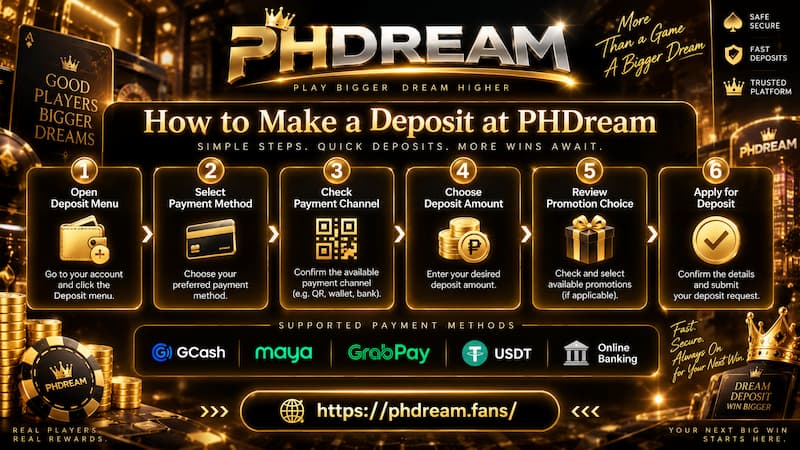
How to Make a Deposit at PHDream
1. Open the Deposit Menu
Go to Personal Center and select Deposit.
The payment methods appear on the left side of the Deposit area. Start by deciding where the money will come from.
2. Select the Payment Method
Choose GCash, Maya, GCashQR, GCASHPAY2, GrabPay, USDT, or Online Banking according to the options available in your account.
If you normally use GCash but already have the required balance in Maya, using Maya may save an unnecessary transfer between wallets.
3. Check the Payment Channel
Some Deposit methods include an additional channel selection.
For GCash, examples currently shown include Ch.20, Ch.26, and Ch.14. Select the channel displayed for the transaction you are making now.
Do not reuse payment details from an old Deposit unless the current instructions specifically direct you to them.
4. Choose the Deposit Amount
Select one of the preset values or enter an eligible amount manually when the field allows it.
Before continuing, check the number once more. A mistaken zero can turn an intended ₱500 transaction into something very different.
5. Review the Promotion Choice
The Deposit screen may include a promotion selection before the transaction is submitted.
One visible option is the First Deposit Bonus, while players can also select:
Do not participate in any promotions
That second choice is useful. A Deposit does not have to be tied to a bonus. If you simply want to add your own funds without promotion conditions, choosing the no-promotion option keeps the transaction straightforward.
6. Apply for Deposit
Once the method, channel, amount, and promotion choice are correct, select Apply for Deposit.
Follow the payment instructions generated for that transaction. Avoid relying on screenshots or payment information saved from an older Deposit because channels and instructions can change.
Choosing a Deposit Method That Fits the Transaction
There is no single payment method that suits every player. The better choice depends on where your funds already are and how comfortable you are with the payment process.
E-Wallet Deposits
GCash, Maya, and GrabPay make sense for people already using those wallets regularly.
They are especially practical when:
- The required balance is already available.
- You are familiar with the wallet’s transaction history.
- You can easily save or retrieve a transfer reference.
- The amount falls within your wallet’s own limits.
The presence of multiple GCash options also gives players alternatives, although the current channel should always be checked before payment.
Online Banking
Online Banking can be a cleaner choice for someone who prefers keeping transactions connected to a bank account.
A bank record can also make it easier to verify the exact amount and time if you later need to compare your payment with Deposit History.
Avoid assuming every bank follows the same process. Follow the banking instructions presented during the transaction instead of using details from another bank or a previous transfer.
USDT Deposits
USDT changes the nature of the Deposit because the transaction moves through a cryptocurrency network rather than a Peso-based wallet or bank.
Before sending USDT, verify:
- The receiving address.
- The supported network.
- The amount being transferred.
- Any network fee shown by your wallet.
A correct address on the wrong network can still create a serious problem. For that reason, USDT is usually more suitable for users already familiar with crypto transfers.
Bonuses and Deposit Choices
Promotions can make a Deposit more interesting, but they should be treated as a separate decision rather than an automatic part of funding the account.
The Deposit area may show a First Deposit Bonus or payment-specific offers such as Maya promotions. Availability can change, so the offer visible during your transaction is the one to examine.
Before opting in, read the current conditions. Pay particular attention to:
- Minimum qualifying Deposit
- Eligible payment method
- Bonus amount or percentage
- Turnover or wagering conditions
- Games or bets that may count differently
- Any withdrawal conditions connected to the promotion
Suppose you intend to Deposit ₱500 simply to use your own balance. If a bonus introduces conditions you do not want, selecting Do not participate in any promotions may be the cleaner decision.
A larger displayed bonus is not automatically the better choice. The useful offer is the one whose conditions match how you actually intend to use the Deposit.
Deposit History and Delayed Transactions
The Deposit process does not finish the moment money leaves a wallet or bank account. Keeping a record of the transaction matters just as much.
PHDream includes a Deposit History section where recent Deposit activity can be checked.
After sending money, keep at least one independent record, such as:
- Wallet transaction reference
- Bank transfer reference
- Screenshot of the completed payment
- Deposit amount
- Approximate payment time
- Payment method used
These details become useful if the account balance does not update as expected.
When a Deposit Has Not Arrived
First, check Deposit History rather than immediately sending the same amount again.
A duplicate payment can turn one unresolved Deposit into two separate transactions that need checking.
The Deposit notice advises players to contact customer service when transactions do not arrive on time. It also states that transaction history can only be checked for up to three days.
That makes timing important. If a Deposit remains unresolved, deal with it while the payment is still recent.
Have the transaction reference, amount, payment method, and time ready before using the contact phdream page or speaking with support. Specific information is far more useful than simply saying that the money is missing.
Final Check
A Deposit can take only a few moments, but the last check is worth doing before money is sent.
Confirm that:
- The correct payment method is selected.
- The current payment channel is being used.
- The Deposit amount is correct.
- The amount falls within the displayed ₱100–₱50,000 range.
- The promotion choice matches your intention.
- The payment instructions belong to the current transaction.
- A receipt or transaction reference can be saved afterward.
A smooth Deposit is rarely about clicking faster. It comes from getting the amount, channel, and payment details right the first time.